Binary Letters: The Alphabet in Binary Code (A–Z)
Every uppercase and lowercase letter in binary, as 8-bit and 7-bit code. Look one up or print the chart.
- Free
- Upper & lowercase
- Printable PDF
- Runs in your browser
Runs in your browser. Nothing you type is uploaded.
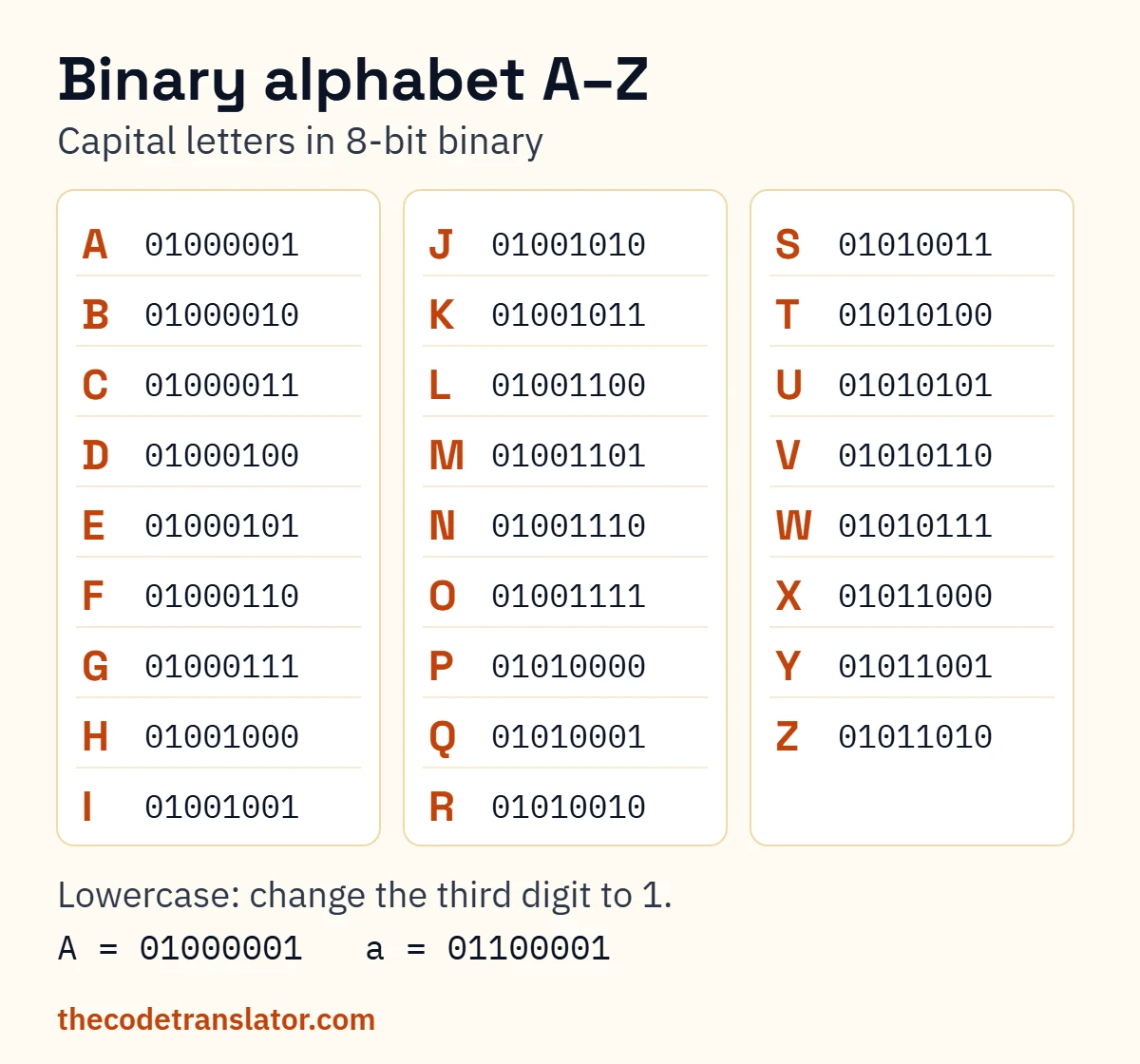
Binary letters are the 0-and-1 codes computers use for each letter of the alphabet: capital A is 01000001, lowercase a is 01100001. The chart below lists all 52 letters in binary, so you can go from letters to binary or from binary to letters at a glance. To decode a whole message instead of one letter at a time, paste it into the binary to text translator.
Letters in binary: A–Z chart
| Letter | Binary (8-bit) | 7-bit | Decimal |
|---|---|---|---|
| A | 01000001 | 1000001 | 65 |
| B | 01000010 | 1000010 | 66 |
| C | 01000011 | 1000011 | 67 |
| D | 01000100 | 1000100 | 68 |
| E | 01000101 | 1000101 | 69 |
| F | 01000110 | 1000110 | 70 |
| G | 01000111 | 1000111 | 71 |
| H | 01001000 | 1001000 | 72 |
| I | 01001001 | 1001001 | 73 |
| J | 01001010 | 1001010 | 74 |
| K | 01001011 | 1001011 | 75 |
| L | 01001100 | 1001100 | 76 |
| M | 01001101 | 1001101 | 77 |
| N | 01001110 | 1001110 | 78 |
| O | 01001111 | 1001111 | 79 |
| P | 01010000 | 1010000 | 80 |
| Q | 01010001 | 1010001 | 81 |
| R | 01010010 | 1010010 | 82 |
| S | 01010011 | 1010011 | 83 |
| T | 01010100 | 1010100 | 84 |
| U | 01010101 | 1010101 | 85 |
| V | 01010110 | 1010110 | 86 |
| W | 01010111 | 1010111 | 87 |
| X | 01011000 | 1011000 | 88 |
| Y | 01011001 | 1011001 | 89 |
| Z | 01011010 | 1011010 | 90 |
| Letter | Binary (8-bit) | 7-bit | Decimal |
|---|---|---|---|
| a | 01100001 | 1100001 | 97 |
| b | 01100010 | 1100010 | 98 |
| c | 01100011 | 1100011 | 99 |
| d | 01100100 | 1100100 | 100 |
| e | 01100101 | 1100101 | 101 |
| f | 01100110 | 1100110 | 102 |
| g | 01100111 | 1100111 | 103 |
| h | 01101000 | 1101000 | 104 |
| i | 01101001 | 1101001 | 105 |
| j | 01101010 | 1101010 | 106 |
| k | 01101011 | 1101011 | 107 |
| l | 01101100 | 1101100 | 108 |
| m | 01101101 | 1101101 | 109 |
| n | 01101110 | 1101110 | 110 |
| o | 01101111 | 1101111 | 111 |
| p | 01110000 | 1110000 | 112 |
| q | 01110001 | 1110001 | 113 |
| r | 01110010 | 1110010 | 114 |
| s | 01110011 | 1110011 | 115 |
| t | 01110100 | 1110100 | 116 |
| u | 01110101 | 1110101 | 117 |
| v | 01110110 | 1110110 | 118 |
| w | 01110111 | 1110111 | 119 |
| x | 01111000 | 1111000 | 120 |
| y | 01111001 | 1111001 | 121 |
| z | 01111010 | 1111010 | 122 |
Binary letters in ASCII, the standard behind the letters in binary code on almost every computer. Every code on this page was checked against the ASCII standard.
Digits and space: 0 00110000 · 1 00110001 · 2 00110010 · 3 00110011 · 4 00110100 · 5 00110101 · 6 00110110 · 7 00110111 · 8 00111000 · 9 00111001 · space 00100000
Need punctuation and symbols too? See the full binary to ASCII table.
What is A in binary?
Capital A in binary is 01000001, and lowercase a is 01100001. Both come from ASCII: A is character 65 and a is character 97. Written without the leading zero, A is 1000001 (7-bit). Each following letter adds one, so B is 01000010 and C is 01000011.
So the binary code for A is 01000001, and the small “a in binary code” is 01100001. Most mistakes come from mixing the two up.
Look up any letter in binary
Type a letter to get its code, or paste a code to see the letter. This binary alphabet translator works both ways: binary code to letters, or letters to binary.
Use the lookup box at the top of this page ↑
Codes people often look up
People don’t only search for letters. They also paste a code straight into Google to find out what it says, and many of those codes are written with 7 digits. Here are 12 that people commonly look up:
1000001A1100001a1100101e1001001I1000011C1101001i1000101E1001000H1010011S1010101U1101100l (lowercase L)1101110nNotice 1001001 (I) and 1101001 (i). They’re one digit apart, and that one digit is the whole difference between a capital and a small letter. More on that below.
One more thing trips people up. As text, 1000001 is A. Read as a plain number it’s 65, which is why the chart has a Decimal column: both readings are right, they just answer different questions.
Spelling more than one letter? See common words and phrases in binary.
Why do some binary letters have 7 digits and some 8?
ASCII, the standard these codes come from, was designed in the 1960s with 7 bits. That’s enough for 128 characters, and the English alphabet fits with room to spare. Computers, though, store text in bytes of eight digits. So each 7-bit code gets a 0 stuck on the front.
1000001 and 01000001 are the same letter. Both are A.
Neither length is wrong. If you’re writing a message for someone else to decode, use the 8-digit version, because a decoder splits a long string every eight digits.
Uppercase vs lowercase letters in binary
Look at A and a side by side and you’ll see it. One bit flips.
| Letter | Uppercase | Lowercase | Bit that changes |
|---|---|---|---|
| A / a | 01000001 | 01100001 | 3rd from left |
| I / i | 01001001 | 01101001 | 3rd from left |
| M / m | 01001101 | 01101101 | 3rd from left |
| T / t | 01010100 | 01110100 | 3rd from left |
| Z / z | 01011010 | 01111010 | 3rd from left |
The third bit from the left is worth 32. It’s 0 for every capital letter and 1 for every lowercase one, which is why a is 97 and A is 65: exactly 32 apart. The same goes for every pair in the alphabet. So once you know t in binary is 01110100, you already know T: flip that bit to get 01010100.
That Z / z row is there on purpose. It’s the pair other binary charts most often get wrong (one popular guide gives capital Z’s code, 01011010, as lowercase z). If a “lowercase” code starts with 010, it’s a capital.
The first three bits tell you the case (010 for capitals, 011 for lowercase). The last five bits give the letter’s position in the alphabet: A = 1, Z = 26. With that pattern in your head, you can read most binary letters without looking at the chart at all.
Want to work out any code without the chart? Learn how to read binary by hand.
How to convert letters to binary
- Find the letter in the chart. Check the case first. S and s are different codes, and that’s the most common slip.
- Copy its 8-bit code. Use eight digits, not seven, so whoever decodes it can split the message cleanly.
- Repeat for each letter, with a space between the codes. A space between words is a character too:
00100000.
Here’s “Sam”, written the way most people write their name:
01010011 01100001 01101101
Capital S, then lowercase a and m. Now in all capitals, SAM:
01010011 01000001 01001101
Only the a and the m changed, each by that one bit. A quick check when you turn the alphabet to binary yourself: every capital starts with 010.
Free printable binary alphabet worksheet
The Print button above gives you the chart on one page. The worksheet goes further, for classrooms or for practising at home:
- Page 1: the A–Z chart, uppercase and lowercase, in 8-bit binary
- Page 2: exercises: decode five short words, write your own name in binary, and circle the bit that changes between A and a
- Page 3: the answer key
It comes in US Letter and A4. It’s a PDF, with no sign-up: download the A4 worksheet or download the US Letter worksheet.
Works for ages 10 and up. Younger kids can start with the uppercase table only and leave lowercase for a second session.
Frequently asked questions
What are binary letters?
They’re the codes computers use to store each letter, written in 0s and 1s. The standard set comes from ASCII. There are 52 of them for English: 26 capitals and 26 lowercase letters.
Why does each letter have 8 digits?
Because computers store each English letter in one byte, and a byte is eight digits. ASCII only needs seven, so the first digit is always 0 for English letters.
Can I convert binary to letters?
Yes. Split the code into groups of eight digits and find each group in the chart above, or paste a code into the lookup box. 01001000 01101001, for example, is H and i: “Hi”.
What is the binary code for a space?
00100000, which is character 32. A space counts as a character, so a two-word message always has a space byte in the middle.
What does 1001001 mean in binary?
It’s a capital I (character 73). Written with eight digits, it’s 01001001, the same letter. If you meant the lowercase i, that’s 1101001.
Do accented letters have binary codes?
Yes, but they take more than one byte. In UTF-8, é is 11000011 10101001, two bytes for one letter. The chart on this page covers the 26 letters of the English alphabet only.
Is the binary alphabet the same on every computer?
For A to Z, yes. ASCII and UTF-8 give English letters and digits the same one-byte codes, so 01000001 means A on a phone, a laptop or a 1980s terminal.
What is a letter code translator?
It’s any tool that swaps letters for codes and back. The lookup box on this page does that for binary letters, one letter at a time.
Every code on this page was checked against the ASCII standard.
Sources: RFC 20, ASCII format for network interchange · RFC 3629, UTF-8