Hello in Binary, Plus Hi, I Love You and Other Words
Common words in binary, ready to copy and paste. Every code is 8-bit ASCII and checked.
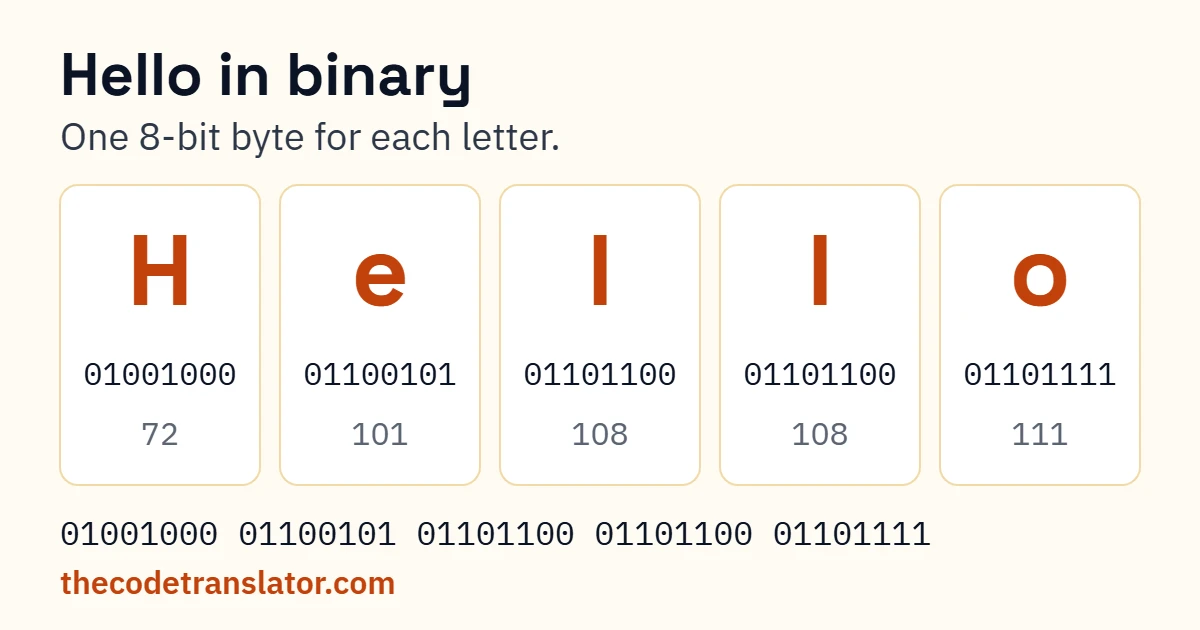
Hello in binary is 01001000 01100101 01101100 01101100 01101111. Below are the words in binary people look up most (hi, I love you, yes, no, help, thank you), each with a Copy button. Want something that isn’t here? Translate any word with our binary translator, or make your own in the box further down.
Hello in binary
Hello in binary is 01001000 01100101 01101100 01101100 01101111: one 8-bit byte per letter, from ASCII. H is 72, e is 101, l is 108 and o is 111. Lowercase hello changes only the first byte, to 01101000. Add an exclamation mark and you get a sixth byte: 00100001.
| Word | Binary |
|---|---|
| Hello | 01001000 01100101 01101100 01101100 01101111 |
| hello | 01101000 01100101 01101100 01101100 01101111 |
| HELLO | 01001000 01000101 01001100 01001100 01001111 |
| Hello! | 01001000 01100101 01101100 01101100 01101111 00100001 |
Put Hello and hello side by side and look at the first byte. 01001000, 01101000. One digit changed, the third from the left, and that’s the whole difference between a capital and a small letter in binary. HELLO in capitals flips that digit in every letter, which is why it shares only its first byte with Hello.
So when someone asks how to say hello in binary code, the honest answer is “which hello?” The table covers all four.
Hi in binary
| Word | Binary |
|---|---|
| Hi | 01001000 01101001 |
| hi | 01101000 01101001 |
| HI | 01001000 01001001 |
| Hey | 01001000 01100101 01111001 |
| hey | 01101000 01100101 01111001 |
Hi is the shortest greeting there is in binary: 16 digits. It’s also the example almost every converter uses, so if you’ve seen 01001000 01101001 somewhere without context, now you know what it said.
I love you in binary
| Words | Binary |
|---|---|
| I love you | 01001001 00100000 01101100 01101111 01110110 01100101 00100000 01111001 01101111 01110101 |
| i love you | 01101001 00100000 01101100 01101111 01110110 01100101 00100000 01111001 01101111 01110101 |
| I LOVE YOU | 01001001 00100000 01001100 01001111 01010110 01000101 00100000 01011001 01001111 01010101 |
| love | 01101100 01101111 01110110 01100101 |
| Love | 01001100 01101111 01110110 01100101 |
I love you in binary code is 10 bytes, not 8. Count the letters and you get eight, but the two spaces are characters too (00100000 each), and they’re what keep the words apart when someone decodes it.
That matters because a different version gets passed around online:
1001001 1001100 1101111 1110110 1100101 1011001 1101111 1110101
Same letters, written with 7 digits each and no spaces. Decode it and you get ILoveYou, all run together. It still works as a message (the person will get it), but if you’re putting it on a card or a gift, use the 10-byte version from the table. It reads back properly.
Yes, no and OK in binary
| Word | Binary |
|---|---|
| yes | 01111001 01100101 01110011 |
| Yes | 01011001 01100101 01110011 |
| no | 01101110 01101111 |
| No | 01001110 01101111 |
| ok | 01101111 01101011 |
| OK | 01001111 01001011 |
What is yes in binary? Three bytes, and only the first one changes when you capitalise it. No is just two bytes: 01001110 01101111. Short enough to tap out on a desk.
Help, thank you and happy birthday in binary
| Words | Binary |
|---|---|
| help | 01101000 01100101 01101100 01110000 |
| Help | 01001000 01100101 01101100 01110000 |
| help me | 01101000 01100101 01101100 01110000 00100000 01101101 01100101 |
| thank you | 01110100 01101000 01100001 01101110 01101011 00100000 01111001 01101111 01110101 |
| happy birthday | 01101000 01100001 01110000 01110000 01111001 00100000 01100010 01101001 01110010 01110100 01101000 01100100 01100001 01111001 |
Happy birthday is 14 characters, so 112 digits. It fits on a card if you start a new line between bytes, never in the middle of one.
What does this binary say? Codes people paste
These are the strings people paste into search most often, decoded:
Got a different one? Paste it into the binary code translator and it’ll tell you. Or decode it yourself: how to read binary by hand shows the method.
Type a word and get its binary. For longer messages, use the text to binary converter.
Your name in binary
To write your name in binary code, swap each letter for its 8-bit code. Capital first letter, lowercase after, the way you’d normally write it. Alex looks like this:
01000001 01101100 01100101 01111000
Capital A, then lowercase l, e and x. Spell any name letter by letter with the binary letters chart, or type it into the box above.
Making a bracelet? It’s 8 beads per letter, one colour for 0 and one for 1. Mia is 24 beads; Alex is 32. Leave a gap or a spacer bead between letters, or nobody (including you, a month later) can read it back.
Frequently asked questions
Why does the same word have different binary codes?
Case. Every capital letter starts with 010 and every lowercase letter starts with 011, so Hello and hello differ in a single bit.
Do spaces count?
Yes. A space is 00100000, and if you leave it out the words run together when someone decodes them.
Why do some sites show 7 digits per letter?
That’s 7-bit ASCII without the leading 0. It decodes to the same letters, but 8 digits per letter is safer for anyone decoding your message, because most decoders split every eight digits.
How many beads do I need for a binary bracelet?
8 per character, spaces included. “Hi” is 16 beads; “I love you” is 80.
Can I write a whole sentence in binary?
Yes. Every character, punctuation included, becomes one byte. Type it into the Make your own box and copy the result.
Is binary a secret code?
No. Anyone with a decoder can read it in seconds. It’s great for fun messages and gifts, but don’t use it for anything private.
Every string on this page was generated and checked against the ASCII standard.