How to Read Binary (and Write It) by Hand
Decode binary code into letters with nothing but place values. No tools needed.
Reading binary means turning each group of 8 digits into a number, then into the character that number stands for. It looks hard and isn’t: you only need eight numbers to decode any byte. This page walks one byte through by hand, then a whole word, then gives you some to try yourself. It’s binary to text explained the slow way, on purpose. If you just want the answer, paste your code into the binary to English translator.
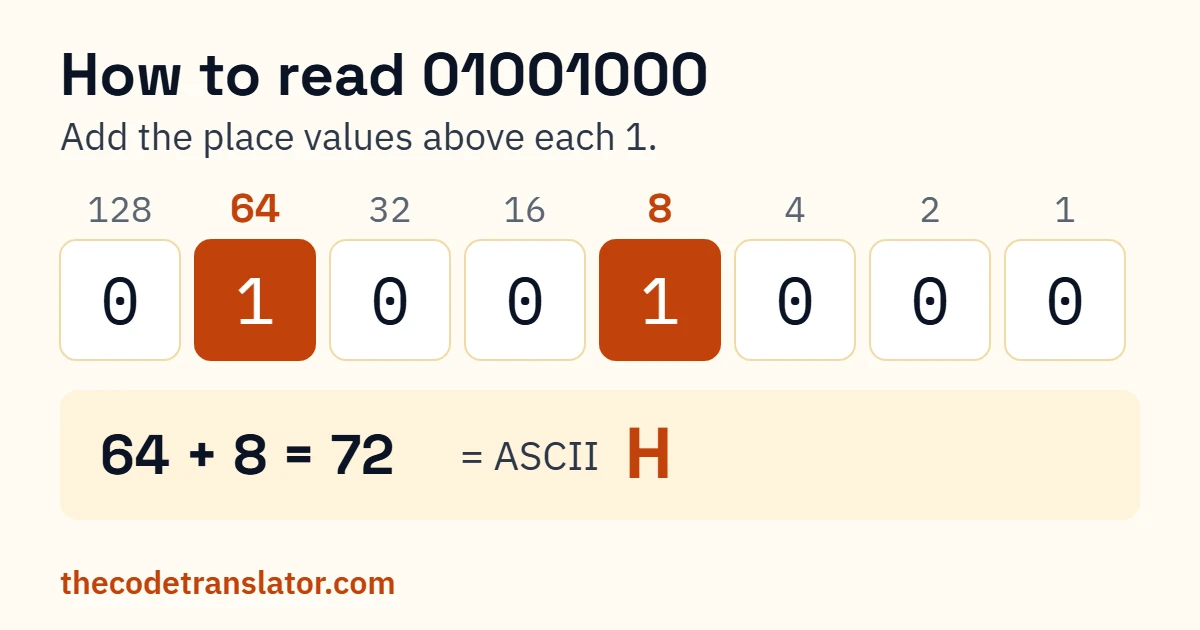
Here’s the whole idea in one byte. Write the eight place values in a row, doubling from the right: 128, 64, 32, 16, 8, 4, 2, 1. Put 01000010 underneath. There’s a 1 under 64 and a 1 under 2, so the byte is worth 66. And 66, in ASCII, is a capital B.
That’s it. Everything below is the same move, repeated.
How to read binary code by hand
To decode binary by hand, split it into groups of eight digits. Write the place values 128, 64, 32, 16, 8, 4, 2, 1 above each group and add the values that sit over a 1. That number is the character’s ASCII code: 66 is B, 105 is i, 116 is t. To check a character’s code, use the binary to ASCII converter.
- Split the code into bytes of 8. If it came with spaces, that’s done for you. If it didn’t, count from the left and draw a line every eight digits. What goes wrong: one missing digit shifts every byte after it, and the rest of the message turns to nonsense. Count the total first; it should divide by 8.
- Write the place values over each byte. 128 64 32 16 8 4 2 1, left to right. Writing them out the first few times is slower, and it’s the step that stops you guessing.
- Add the values over every 1.
01101001has 1s under 64, 32, 8 and 1: 64 + 32 + 8 + 1 = 105. What goes wrong: adding the values over the 0s instead. Circle the 1s before you add. - Look up each number. 65 to 90 are the capitals A to Z, 97 to 122 are lowercase a to z, and 32 is a space. The binary alphabet lists every letter with its code if you’d rather not count.
Binary to text example: decoding a whole word
Plenty of tutorials decode one letter and wave at the rest. Here’s every byte of 01000010 01101001 01110100:
| Byte | Values over the 1s | Total | Character |
|---|---|---|---|
01000010 | 64 + 2 | 66 | B |
01101001 | 64 + 32 + 8 + 1 | 105 | i |
01110100 | 64 + 32 + 16 + 4 | 116 | t |
The answer is Bit. That’s a complete binary to text conversion example, start to finish. Three bytes, three additions, three lookups.
The shortcut for letters
Once you’ve done a few, you’ll notice every letter starts the same way. That’s not a coincidence, and it gives you a way to translate binary to letters without the 128 column or a chart.
The first three digits tell you the case: 010 means a capital, 011 means lowercase. The last five digits are the letter’s place in the alphabet.
01000010→010(capital) and00010(2) → the 2nd letter, B01110100→011(lowercase) and10100(16 + 4 = 20) → the 20th letter, t
Five digits only go up to 31, so the sums stay small. Most people can read short words this way in their head after ten minutes of practice. (It’s also why a capital and a lowercase letter differ by exactly one digit: the third one.)
How to write in binary
Writing in binary code is the same process backwards. Take the letter d:
- Find its code. A capital is 64 plus its place in the alphabet; a lowercase letter is 96 plus its place. d is the 4th letter and lowercase, so 96 + 4 = 100.
- Take away the biggest place value that fits, and put a 1 there. 128 is too big. 64 fits: 100 − 64 = 36. That’s a 1 under 64.
- Keep going with what’s left. 32 fits into 36: 36 − 32 = 4, so a 1 under 32. 16 and 8 don’t fit. 4 does: 4 − 4 = 0, a 1 under 4. Everything else is 0.
- Read it off, eight digits long.
01100100. For letters, the first digit is always 0.
To spell a word in binary, do that for each letter and leave a space between the bytes. A space between words is a character too: it’s 32, or 00100000. Forget it and your words run together when someone decodes them.
Your turn
Decode these:
1. 01001101 01100001 01110000
Show answer
Map (77, 97, 112)
2. 01101111 01110111 01101100
Show answer
owl (111, 119, 108)
3. 01011010 01101001 01110000
Show answer
Zip (90, 105, 112)
Write these in binary:
4. Ok
Show answer
01001111 01101011
5. Code
Show answer
01000011 01101111 01100100 01100101
Check your answer with the text to binary converter.
For more practice, decode the everyday words on words in binary.
Check your work
Before you trust an answer, run through these:
- Every letter byte starts with
0. If a byte starts with1, it isn’t a basic English letter. Recount your split. - Capitals are 65–90; lowercase letters are 97–122. A total outside those is a digit, a space or punctuation, which is fine if you expected one.
- A total under 32 isn’t a letter at all. It’s a control code, and it usually means the bytes were split in the wrong place.
Got codes with only 5 digits?
Some classroom worksheets and puzzles number the letters from A = 1 using 5 digits: A is 00001, B is 00010, Z is 11010. That’s a puzzle code, not ASCII, so a binary translator won’t read it. It’s the same as the last five digits of the ASCII code, though, which means the letter shortcut above works on it directly: 01000 is 8, so H.
Frequently asked questions
How do I translate binary to letters without a chart?
Use the shortcut. The first three digits give the case (010 capital, 011 lowercase) and the last five give the letter’s place in the alphabet. 01000101 is a capital, and 00101 is 5, so it’s E.
How does binary to text work?
Every character has a number, set by the ASCII standard: A is 65, a is 97, a space is 32. Binary is that number written with only 0s and 1s, one byte per English letter.
Why are there 8 digits per character?
Computers store text in bytes, and a byte is 8 bits. ASCII only needs 7, so the first digit is 0 for every English letter, digit and punctuation mark.
Can I read binary numbers the same way?
For a single byte, yes: add the place values over the 1s and you have the number. This page sticks to text, where that number stands for a character.
What’s the hardest part of reading binary?
Splitting it. One missing or extra digit throws off every byte after it, so count the digits before you start adding.
Is it worth learning to read binary by hand?
If you’re studying computing or solving puzzles, yes. Once the letter shortcut clicks, a short word takes seconds, and you’ll spot mistakes in other people’s binary straight away.
Every example on this page was decoded and checked against the ASCII standard.